Want to see it first? Set up Cybee walks you through the three steps in about three minutes.
Before you start
| You need | How to check |
|---|---|
| A Mac with an Apple chip, M1 or newer, on macOS 15 or newer | Open the Apple menu and choose About This Mac. Next to Chip, the name starts with Apple M. If there is no Chip line, Cybee cannot run on that Mac. |
| Your Mac’s password | The one you type to log in to this Mac. Your account must be allowed to install apps. On a Mac you set up yourself, it is. |
| An internet connection | The installer downloads Cybee from get.cybee.dev, Cybee’s install server. |
| Your AI assistant | ChatGPT, Claude, Codex, Cursor or Grok. Terminal works too. Copilot is not supported. |
| No account | There is nothing to sign up for. The install creates one list for all your Macs, which Cybee calls your organization, and an admin token, a long code that starts with cyk_ and is saved on this Mac. The token lets your AI assistant manage your Macs. Terminal calls it your admin token. |
Where to run it
Run the line in Terminal, a chat, your IDE or a CLI. Keep working where you started.
Terminal
Open Terminal, paste the line and press Return.
Then cybee status
Chat
Paste it into your AI assistant’s chat and ask it to install Cybee. This needs an assistant that runs on your Mac, such as Claude Code, Codex or Cursor. A chat in a browser tab cannot reach your Mac.
Then restart the chat and type /cybee
IDE
Paste it into the terminal in Cursor, or ask Cursor to run it.
Then restart Cursor and type /cybee in its chat
CLI
Ask Claude Code or Codex to run it. macOS asks for your password in a window.
Then /cybee in a new session
Install, step by step
- 1
Open Terminal.
Press Command and Space, type Terminal, press Return. You can also find it in Applications, in the Utilities folder.
What you will see: a window with a blinking cursor.
- 2
Paste the line and press Return.
curl -sSf https://get.cybee.dev | shPress Command and C to copy.
Copy it here, click into Terminal, press Command and V, then Return.
What you will see: lines that start with ==> while Cybee downloads and checks Apple’s signature.
What does this line do?
What the line does.
It downloads Cybee’s install script from get.cybee.dev and runs it on this Mac. The script checks that Apple notarized the Cybee package before it installs anything, and stops if that check fails.
You can read the whole script in your browser before you paste the line.
- 3
Type your Mac’s password.
When Terminal shows Password, type the password you use to log in to this Mac and press Return. Nothing appears while you type. That is normal. Why macOS asks
What you will see: Cybee is installed, then your admin token, a long code that starts with cyk_ and is also saved on this Mac.
- 4
Switch on CybeeES.
System Settings opens at Full Disk Access by itself. Find CybeeES in the list and switch it on. CybeeES is the name Cybee has in that list. macOS may ask for your password again. Terminal waits while you do this.
System Settings · Privacy & SecurityFull Disk Access
CybeeESOnOther apps may be in the list. Switch on CybeeES only.
Look for CybeeES in the Full Disk Access list and switch it on. What you will see: Terminal says Protection is ON.
- 5
Type /cybee in your AI assistant.
Restart your AI assistant first: quit and reopen the Claude app, restart Cursor or Codex, or start a new session in Claude Code. Then open Claude Code, Codex, Cursor, Grok Build or the Claude app and type /cybee. It guides you from there. For claude.ai, ChatGPT or Grok, connect Cybee once in the app’s connector settings with
https://mcp.cybee.dev/mcp. A “Connect Cybee” page asks for your admin token one time. It starts with cyk_. Paste it on that page, never into a chat message.What you will see: an answer about this Mac, and questions to ask next.
What Cybee shows you after the install
About 20 seconds after the install, Cybee opens a window on this Mac, once. It has three steps.
- 1
Cybee is installed.
The window says Cybee checks this Mac for threats and risky settings and keeps working when the window is closed. It lists three things: authorized by Apple, runs on this Mac, and file contents stay here.
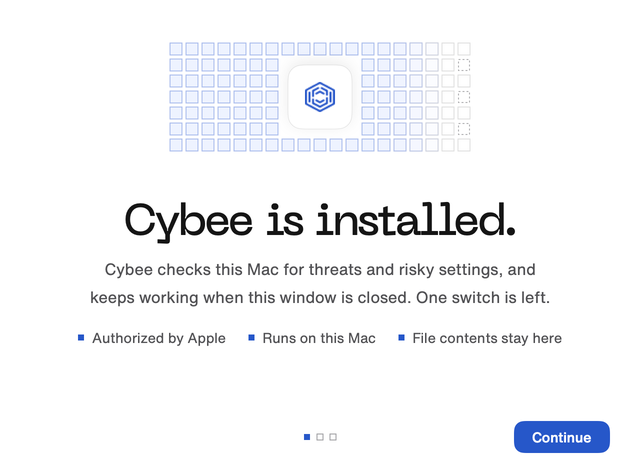
The first window, shown once after the install. - 2
One switch, once.
Open System Settings, then Privacy & Security, then Full Disk Access, and switch on CybeeES. macOS asks for this once. To open that pane from Terminal, type
cybee grant-fda. - 3
Ask Cybee anything.
The last step offers to open an AI assistant, such as Claude, with Cybee typed in the box. Send it, and you get a plain answer about your Macs and the next step.
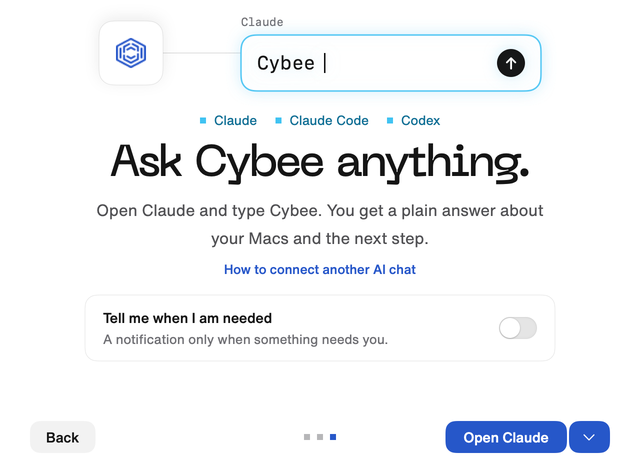
The last window, with an AI assistant ready to open. If your AI assistant is not on the list, the next screen explains how to connect it. Cybee answers inside the AI assistant you already use. You add it once, with an address and your admin token.
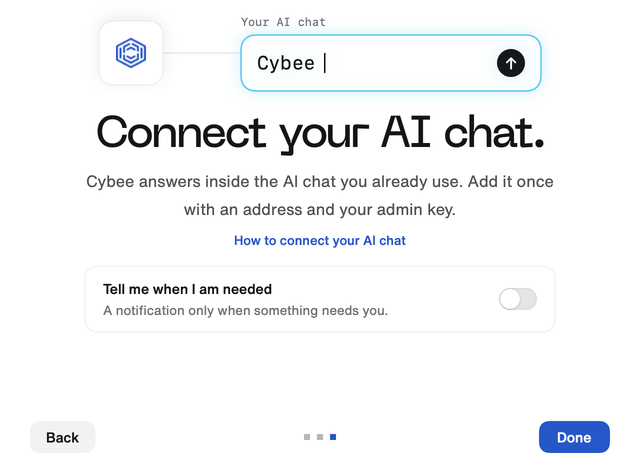
The same window for an AI assistant that is not on the list.


Which AI assistants connect
- Claude Code, Codex, Cursor, Grok Build and the Claude app connect on their own.
- claude.ai, ChatGPT and Grok are set up once in their connector settings, with the address
https://mcp.cybee.dev/mcpand your admin token. Paste the token on the Connect Cybee page, never into a chat message. - Copilot is not supported.
- Claude Code also has a
/cybeecommand.
Add a teammate’s Mac
About 2 minutes per Mac.
Ask your AI assistant to invite a teammate. It gives you the line with the join token filled in. The values below are examples: Dana Meier is a made up name and Acme Dental is a made up company.
On a teammate’s Mac:
curl -sSf https://get.cybee.dev | sh -s -- --join <join token> --owner "Dana Meier"On your first Mac, to name the company:
curl -sSf https://get.cybee.dev | sh -s -- --name "Acme Dental"What macOS asks you
macOS asks twice, and both times the choice is yours. After the install, Cybee asks you before it changes anything on this Mac.
-
during the install
Your Mac’s password.
Installing security software needs an administrator, so macOS checks it is you. The password goes to macOS, not to Cybee. Type it in Terminal or in the macOS window, never in a chat.
-
right after
One switch: CybeeES.
macOS lets security software watch what programs do only once you switch it on under Full Disk Access. Protection starts then.
Can Cybee read my files then?
What the switch allows.
Yes, Cybee can look at files on this Mac. It needs that to watch what programs do and to compare files with a list of known bad software. All of this happens on the Mac. What is in your files is never sent to Cybee.
Only security facts leave your Mac, such as which settings are on and which apps are installed.
Never file contents, saved passwords or app tokens.
What Terminal shows
Terminal writes a line for each thing the installer does. Here is the whole install, and what each line means.
          ~ $ curl -sSf https://get.cybee.dev | sh
          ==> creating your Cybee organization
          ==> downloading Cybee (arm64)
          ==> verifying Apple signature & notarization
          ==> installing (you may be asked for your password)
          Password:

            Cybee is installed

            Your admin token (also saved to ~/.config/cybee/admin_token)
            │ ••••••••••••••••••••••••••••••••

            Last step: turn on Full Disk Access
            │ A System Settings window is opening at Full Disk Access.
            │ Find CybeeES in the list and switch it on.

            Waiting for you to enable it .......
            Protection is ON. Cybee is watching this Mac in real time.

            Connecting your AI assistants
            │ …

            Remove any time:  sudo cybee uninstall
| Terminal says | What it means |
|---|---|
creating your Cybee organization | Your Macs get a home at Cybee. Nothing to sign up for. |
verifying Apple signature | It checks that Apple notarized the package. If the check fails, it stops and installs nothing. |
Password: | Type your Mac’s password. Nothing shows while you type. |
Your admin token | The token that lets your AI assistant manage your Macs. It starts with cyk_ and is saved on this Mac. Keep it private. Paste it only on the Connect Cybee page, never into a chat message or an email. |
Last step | System Settings opens. Switch on CybeeES. |
Protection is ON. | Done. Cybee is protecting this Mac. |
Connecting your AI assistants | The assistants on this Mac that Cybee set up for you. |
Ask your first question
Open your AI assistant and type /cybee. Cybee answers about this Mac and suggests what to ask next. Nothing on your Mac changes from a chat until you say yes.
/cybee
Used Cybee
Protected. One setting is off.
- Macs
- 1 of 1
- Checks
- 117 of 118
- Alerts
- 0 open
Ask next
Which setting is off?
How do I add a teammate’s Mac?
What can we show a client?
Dated recordShow the record
In Terminal, type cybee status to see whether protection is on.
What to do next
-
your team
Add your team’s Macs.
Ask your AI assistant to invite a teammate, then paste the line it gives you on their Mac. The plain line would start a separate organization.
Team devices -
this week
Ask what needs attention.
Try “Which Mac needs attention?” or “Which AI tools are on our Macs?” in your AI assistant.
Your AI assistant -
before a client asks
Read your record first.
Check the dates and any Macs that are missing before you share it with anyone.
Trust Passport -
Cybee subscription
Try it for 14 days.
Ask your AI assistant for security training. The Stripe link for your trial arrives in the chat.
Plans and trial
If the install stops
Find the message or the moment that matches yours. They are in the order you would meet them.
You pasted the install line into a chat
A chat in the browser cannot reach your Mac. Paste the line into Terminal instead.
Terminal says “Apple Silicon Macs only”
This Mac has no Apple chip. Cybee does not run on it, and nothing was installed.
Terminal says “package not notarized”
Apple’s check failed, so the installer stopped and installed nothing. Do not try to get around it. Email [email protected] with the message.
Nothing appears when you type your password
That is how macOS keeps it private. Type it anyway and press Return.
Terminal says “Sorry, try again”
The password was not right. Type the one you use to log in to this Mac.
Terminal says “not in the sudoers file”
This account cannot install apps. Sign in with an administrator account, or ask the person who set up this Mac.
Terminal says “installation was not authorized”
The password window was closed before you typed in it. Run the line again and type your password when macOS asks.
You missed the System Settings window
Open System Settings, then Privacy & Security, then Full Disk Access, and switch on CybeeES. In Terminal, type cybee status to check that protection is on.
Terminal says “already enrolled”
Cybee is already on this Mac, and your organization stays as it is. Type cybee status to see it.
Your AI assistant does not answer /cybee
In Terminal, type cybee connect and press Return. It connects the assistants it finds on this Mac. Then restart your AI assistant. If yours still does not answer, email us its name.
Remove Cybee
In Terminal, type sudo cybee uninstall, press Return, then type your Mac’s password.
To retire a lost or old Mac, ask your AI assistant to remove it. Its row stays on your team’s list, marked removed.